


Creating a free membership website is one of the easiest ways to bring your community together online. It becomes the central hub for your members to access exclusive content, register for events, and connect with others anytime, anywhere. If you find yourself juggling resources over email chains, social media, or even a shared drive, a membership website can simplify everything.
Beyond member engagement, a membership website is a major revenue generator, allowing you to implement paid membership tiers (if you haven’t already). This means a simple website becomes the dedicated space for your people and provides financial stability through recurring income.
Small budget? No technical experience? No problem, it’s easier than you think to create a free membership website, so your organization can grow without a big investment of time or money
In this guide, we’ll walk you through everything membership websites: what they are, the different types, and how to create one. Plus, we’ll share the free platforms we recommend, as well as budget-friendly options with more capabilities if you have a larger organization.
Let’s dive in!
What Is a Membership Website?
A membership website is a site where your members can access content, resources, or benefits that aren’t available to the public. Most of the time, they pay dues or a subscription to unlock these exclusive features; think of it as a VIP area for your organization’s community.
For nonprofits, associations, and clubs, a membership website becomes the central hub where members can log in to find everything they need. This might include members-only resources, event registrations, community updates, discussion forums, or a member directory.
Behind the scenes, a membership website typically includes a few key pieces:
- Members-only areas where exclusive content and resources live
- Online sign-up and registration so new members can easily join, and current members can register for events
- Payment processing to collect membership dues, ecommerce sales, or event tickets
- A member database to keep track of contacts, memberships, and access levels
Unlike a regular website, where everything is public, this is a password-protected area where members log in to access premium resources. This allows you to provide exclusive value to members, strengthen your community, and even generate revenue through dues, events, or quality content.
Types of Membership Websites
Before you start creating your site, determine which membership model aligns best with your organization and membership needs.
Content-Based Memberships provide exclusive access to articles, videos, online courses, and downloads. Revenue typically comes from subscription fees or dues, making this ideal for online magazines, educational platforms, and associations sharing industry resources.
Community-Based Memberships prioritize connection through private forums, networking opportunities, and member directories. Professional groups, alumni associations, and hobby communities often charge monthly or annual dues to access these member interactions.
Service-Based Memberships offer ongoing coaching, consulting, or support with tiered subscription fees. And, if your event management software allows you to create membership tiers, you can also seamlessly offer exclusive workshops for different membership levels.
Product-Based Memberships include subscription boxes, member discounts, and free shipping. Think of Amazon Prime, where the membership fee unlocks benefits that encourage repeat purchases, such as free shipping. We won’t be focusing as much on this type of membership, since it’s uncommon among nonprofits and other organizations considering free membership sites.
Hybrid Models combine exclusive resources, community, and other perks for comprehensive experiences. For example, professional associations often offer conferences, research reports, networking directories, and discounts under one membership umbrella. Membership website builder software supports multiple revenue streams and makes it easy to start simple and then scale your offerings.
How to Plan Your Membership Website
Once you’ve determined your membership model, there are a few things to research. This planning phase will help you build something people actually want to join, giving a great membership experience and higher revenue for your organization.
Research Your Audience
Statistics show 79% of memberships that built their audience pre-launch saw higher success than those that didn’t. To create a membership site that appeals to potential members, you’ll need to know what truly resonates with them.
For example, an animal nonprofit might create a downloadable activation kit that enables members to throw their own fundraising events for their local chapter. Whereas a baking club might provide a library of recipes so members can create treats for their community. A professional organization, such as a trade association, could provide proprietary market research and valuable industry insights in the members area of its website.
To figure out what your audience wants to see, survey potential members about their pain points and what they’d be willing to pay for. It also helps to analyze competitor offerings and pricing, then identify content gaps you can fill.
Choose Your Membership Model
As we mentioned earlier, base your membership model on what your audience wants to see. Select from content, community, service, product, or hybrid approaches, and ensure they align with your organizational goals and capacity. For detailed guidance, explore various membership model options and how they work in practice.
Create Your Pricing Structure
Research competitor pricing in your niche and calculate your overhead costs, including platform fees, content creation, and marketing.
Data shows the most popular membership pricing is $25-$49 monthly (41.81%), followed by $15-$24 monthly (19.21%). Most successful sites (56.9%) offer both monthly and annual billing with discounts for annual commitments. For more comprehensive strategies, review these membership pricing best practices.
You can also develop non-dues revenue streams through special events, premium add-ons, or partnerships that complement your core member benefits.
Define Your Brand and Content Strategy
Create a cohesive brand identity for your site, including your site name, logo, color scheme, and fonts. Plan basic public pages (think: homepage, About Us, Contact) and your members-only content calendar, which will include resources, exclusive sections, and events.
Just remember: Consistency matters more than perfection. Since 15.1% of owners cite content creation as their biggest challenge, set realistic expectations about what you can produce and deliver reliably.
Read more: Mission to Messaging: The 2025 Nonprofit Branding Playbook
Essential Features in a Membership Website Builder
Choosing the right platform begins with understanding which features you actually need versus your nice-to-haves. Review key features – what will help your organization see success? Research your membership website platform options, create a shortlist of 3-4 contenders, and then make your final decision.
Platform Comparison: Must-Have Features
- Member-Only Content: The core feature for any membership site. Without easy content gating, you’re not really running a membership site.
- Member Database: Functionality is non-negotiable – you need to track member information, renewal dates, and engagement. This also enables members to find one another and connect via the member directory.
- Payment Processing: Allows you to accept dues, donations, and subscription payments without having to process them manually. When payment processing integrates seamlessly with your member database, it makes automating membership renewals a breeze.
- Event Management: Critical if you plan to host webinars, conferences, or networking events.
- Email Marketing: Tools that allow you to communicate with members through newsletters, announcements, and targeted campaigns. Look for built-in or integrated email tools when reviewing membership platforms.
- Mobile Apps: Make it simple for members to access your community from anywhere, though this feature typically requires a paid plan for your membership platform of choice.
- Website Builder: Determines how much technical skill you need. All four platforms offer some form of drag-and-drop or visual editing, though they vary in ease of use and flexibility.
Let’s look at how four popular platforms compare across the features that matter most:
Must-Have Features Comparison Table for 4 Popular Platforms
| Feature | Why It Matters | WildApricot | WordPress | Wix | Weebly |
| Member Database | Track member info, renewals | ✅ Built-in | ⚠️ Plugin required | ⚠️ App required | ⚠️ Basic only |
| Payment Processing | Accept dues/donations | ✅ Integrated | ⚠️ Plugin required | ✅ Integrated | ✅ Integrated |
| Event Management | Register attendees online | ✅ Built-in + mobile check-in | ⚠️ Plugin required | ⚠️ Limited | ❌ Not included |
| Email Marketing | Communicate with members | ✅ Unlimited member emails | ⚠️ Plugin required | ? Paid add-on | ? Paid add-on |
| Mobile App | Members access on the go | ✅ iOS + Android (paid plans) | ⚠️ Plugin dependent | ❌ Not offered | ❌ Not offered |
| Website Builder | No coding required | ✅ Drag-and-drop | ✅ Gutenberg editor | ✅ Drag-and-drop | ✅ Drag-and-drop |
| Member-Only Content | Gate exclusive resources | ✅ One-click restrict | ⚠️ Plugin required | ? Paid add-on | ⚠️ Basic only |
Key Takeaway: WildApricot (that’s us!) is the only platform with all key membership features built-in (no plugins required), designed specifically for associations, nonprofits, and clubs. Our software offers a 60-day free trial, so you have ample time to test out the tech before committing.
Additional Critical Features
Beyond the basics listed above, you can also look for:
- Automated renewal reminders that reduce churn
- Custom membership levels let you create tiered pricing with different benefits at each level
- A searchable member directory helps members network with one another, increasing engagement and perceived value
- Online forms for applications and surveys make it easy to gather information without manual data entry
- Reporting and analytics help you understand what’s working and what isn’t, allowing you to improve over time
The average member retention is 12.3 months, but robust features like these can significantly extend this. When members can easily access what they need, connect with others, and see regular value from their membership, they stick around longer. For more insights on keeping members engaged long-term, explore these member retention strategies.
11 Best Membership Website Builders for 2026
Understanding your options helps you make an informed decision about where to create a membership website. Let’s break down the landscape of some of the top membership website builders available today.
Here’s how the major platforms compare at a glance:
Comparison Overview Table
| Platform | Free Tier | Member Limit | Best For | Monthly Cost (Paid) | Free Trial Length |
| WildApricot | ❌ Free trial only | 100 contacts | Nonprofits, associations, clubs | $56+ | 60 days |
| WordPress | ✅ Free (self-hosted) | Unlimited | Tech-savvy users | $0 (hosting fees apply) | N/A |
| Weebly | ✅ Free forever | Unlimited | Simple sites | $12+ | N/A |
| Wix | ❌ Trial only | N/A | Design-focused sites | $17+ | 14 days |
| MembershipWorks | ✅ Free forever | 50 contacts | Basic needs | $35+ | N/A |
| Memberful | ❌ Test mode only | N/A | Content creators | $49+ | Test mode |
| Thinkific | ❌ Trial only | 1 product | Course creators | $36+ | 30 days |
| Teachable | ✅ Limited free | Unlimited | Course creators | $29+ (+ 10% fees) | N/A |
| Squarespace | ❌ Trial only | N/A | Portfolio sites | $16+ | 14 days |
| Mighty Networks | ❌ Trial only | N/A | Community builders | $79+ | 14 days |
| Kajabi | ❌ Trial only | N/A | All-in-one creators | $143+ | 14 days |
Category Winners
- ?Best for non-profit membership organizations: WildApricot offers a robust feature set that ticks all the boxes for most non-profits (easy to use, payment processing, automated renewal features, etc.). Organizations can get a free 60-day trial at only $56.10/month for 100 contacts.
- ?Best for tech-savvy users: WordPress is free when self-hosted ($10-20/year domain + $5-30/month hosting). Maximum customization with plugins like MemberPress, but the steepest learning curve.
- ?Best for course creators: Teachable provides free plan with unlimited students ($1 + 10% transaction fees). Paid plans from $29/month eliminate fees.
- ?Best for visual design: Wix delivers beautiful templates with intuitive design interface. 14-day trial only, paid plans from $28/month.

Detailed Platform Reviews
1. WildApricot
WildApricot is an all-in-one membership management software designed specifically for nonprofits, associations, and clubs. Unlike generic website builders, Wild Apricot was built from the ground up to handle the unique needs of membership organizations.
Features:
- Membership database and management
- Website builder with member-focused templates
- Event management and online registration
- Email marketing and newsletters
- Online payment processing
- Member-only content areas
- Mobile app for members
- Online store capabilities
- Automated invoicing and renewal reminders
- Integration with accounting software
Pricing/plans: Paid plans start at $56.10/month for 100 contacts
Length of free trial: 60-day free trial with full features
2. WordPress
WordPress is free, open-source software that powers over 40% of all websites. With the right membership plugins, it becomes a powerful platform for creating membership sites. Statistics show 65.52% of membership sites use WordPress plugins.
Features:
- Completely customizable with thousands of themes
- Extensive plugin ecosystem
- SEO-friendly architecture
- Complete ownership of your data
- Membership plugins like MemberPress and Paid Memberships Pro
- WooCommerce integration for e-commerce
- Community forums capabilities
- Multi-language support
- Advanced user role management
- Custom post types for exclusive resources
Pricing/plans: Free software; costs include domain ($10-20/year), hosting ($5-30/month), and membership plugins ($0-$399/year)
Length of free trial: Software is permanently free; hosting varies by provider
3. Weebly
Weebly is a drag-and-drop website builder known for its simplicity and ease of use. It’s one of the few platforms offering genuinely free membership features, making it accessible for small organizations just getting started.
Features:
- Drag-and-drop website builder
- Mobile-responsive templates
- Member registration and login
- Password-protected pages (Professional plan and above)
- E-commerce capabilities
- Email marketing tools
- Contact forms and lead capture
- Basic SEO tools
- Integration with Square for payments
- App marketplace for extensions
Pricing/plans: Free plan available; Professional plans start at $12/month (billed annually)
Length of free trial: Free forever plan available with Weebly branding
4. Wix
Wix a user-friendly website builder with stunning templates and AI-powered design assistance. While it doesn’t offer a true free plan for membership sites, its features and design make it popular among organizations that prioritize visual appeal.
Features:
- AI-powered website builder (Wix ADI)
- 800+ professional templates
- Advanced drag-and-drop editor
- Member login and registration
- Password-protected pages
- Online payments and e-commerce
- Email marketing campaigns
- SEO and marketing tools
- Wix Bookings for appointments
- Mobile app for site management
Pricing/plans: Light plan starts at $17/month; Business plans with membership features start at $29/month
Length of free trial: 14-day free trial for premium features
5. MembershipWorks
MembershipWorks is a web-based membership system that integrates with your existing website, whether it’s WordPress, Squarespace, Weebly, or a custom HTML site. This flexibility lets you keep your current website while adding powerful membership features.
Features:
- Membership database and management
- Member directory with custom fields
- Event calendar and registration
- Online payment processing (Stripe, PayPal, Authorize.net)
- Member-only content areas
- Forms and applications
- Email communications
- Job boards and classified ads
- Integration with QuickBooks and Xero
- MailChimp integration
Pricing/plans: Free up to 50 contacts; Paid plans start at $35/month (up to 300 contacts)
Length of free trial: Free up to 50 contacts; 30-day money-back guarantee on paid plans
6. Memberful
Memberful is designed for content creators and publishers who want to add membership and subscription features to their existing websites. It integrates seamlessly with WordPress, but development test mode is free while building your site.
Pricing/plans: Paid plans start at $49/month; best for content creators and publishers monetizing existing audiences.
Length of free trial: Free test mode for development; no free tier for live sites
7. Thinkific
Thinkific specializes in online course creation but includes membership site capabilities. It’s ideal for organizations whose primary focus is educational content delivery rather than traditional membership management.
Pricing/plans: Paid plans start at $36/month; best for course creators and educational organizations.
Length of free trial: 30 days
8. Teachable
Teachable is another course-focused platform with membership features. The free plan includes transaction fees, making it viable for testing but requiring upgrade as you grow.
Pricing/plans: Free plan available with $1 + 10% transaction fees; Paid plans start at $29/month; best for educators and course creators.
Length of free trial: Free plan with transaction fees
9. Squarespace
Squarespace is known for award-winning templates and design quality. While more limited in membership-specific features than dedicated platforms, its visual appeal makes it popular for design-conscious organizations.
Pricing/plans: 14-day free trial; Business plans start at $16/month; best for organizations prioritizing design aesthetics.
Length of free trial: 14-day free trial
10. Mighty Networks
Mighty Networks focuses on community building with courses, events, and memberships under one platform. It’s particularly strong for organizations where community interaction is the primary value proposition.
Pricing/plans: 14-day free trial; Paid plans start at $79/month; best for community-focused organizations.
Length of free trial: 14-day free trial
11. Kajabi
Kajabi is an all-in-one platform for knowledge entrepreneurs combining courses, memberships, coaching, and podcasts. It’s the most expensive option but includes comprehensive marketing automation and business tools.
Pricing/plans: 14-day free trial; Paid plans start at $143/month; best for established creators and entrepreneurs with existing audiences.
Length of free trial: 14-day free trial
How to Create a Membership Website (Step by Step)
Once you’ve chosen your platform, it’s time to actually create a membership website. This step-by-step process works whether you’re building on WildApricot, WordPress, or another platform.
Step 1: Get Started With Your Preferred Platform
Review the comparison table from the previous section and consider three key factors: your budget, your technical skills, and your growth plans. If you’re not technical and need something to work quickly, WildApricot or Wix makes sense. If you have development resources and want total control, WordPress might be a better fit.
Sign up for free trials on 2-3 platforms to test them before committing. We recommend starting with WildApricot’s 60-day trial because it gives you full access to all features for two months—enough time to build your entire site, test it with real members, and decide if it’s the right fit.
Step 2: Secure Your Domain and Hosting
Your domain name is your web address—think www.yourorganization.com. Keep it simple and memorable, and ensure that it reflects your brand or organization’s name. Use domain search tools to check availability and expect to pay $10-20 per year.
Hosting is where your website files live on the internet. Cloud-based platforms like WildApricot and Wix include hosting in their monthly fee, which simplifies things considerably. Self-hosted platforms like WordPress require you to purchase hosting separately from a provider like Bluehost, SiteGround, or WP Engine.
With WildApricot, hosting is included in all plans, so you don’t need to worry about server management, security updates, or technical maintenance.
Step 3: Design Your Site Structure
Every membership website needs certain core pages. Your homepage should feature a clear value proposition that immediately tells visitors why they should become members. The About Us page communicates your mission, vision, and introduces your team. A dedicated membership levels page lays out your pricing and what members get at each tier.
The members-only area is where your exclusive content lives, protected by password access. Your contact page makes it easy for prospective members to reach you with questions. Consider adding a blog or news section to demonstrate ongoing value and improve search engine optimization.
Structure your navigation logically—visitors should be able to find key information within three clicks. Make “Become a Member” or “Join Now” prominent throughout your site.
Step 4: Create Members-Only Content
Before you launch, prepare at least 3-5 pieces of member-only content. This might include educational resources such as guides, templates, and videos; a member directory to facilitate networking; a private forum or discussion board for community interaction; and an event calendar showcasing upcoming opportunities.
The content doesn’t need to be perfect, but it should be valuable enough that members feel good about paying for access. Nothing kills a new membership faster than signing up only to find empty or low-quality resources behind the paywall. Newbie members will bounce and never return.
Step 5: Set Up Payment Processing
Connect your payment gateway—options include Stripe, PayPal, and Square. Configure your membership pricing tiers with the exact amounts and billing frequencies. Set up automated recurring billing so members don’t have to manually renew each month or year.
Test the checkout process thoroughly before launch. Sign up as a test member, go through the entire payment process, verify the confirmation email arrives correctly, and ensure access is granted immediately. One broken link in the checkout process can cost you significant income.
Note that WildApricot users in the U.S. and Canada can use Personify Payments with integrated processing, or connect other processors with a 20% servicing fee. This online payment processing integration ensures smooth transactions.
Step 6: Launch and Test
Before you announce your membership to the world, run through this testing checklist:
- Test the complete registration process as if you’re a brand-new member.
- Verify payment processing works correctly with real test transactions.
- Check that member-only content restrictions are working—non-members shouldn’t be able to see exclusive resources.
- Preview your entire site on mobile devices to ensure it’s responsive.
Only when everything works smoothly should you officially go live.
How to Grow Your Membership
Launching your site is just the beginning. Sustainable growth requires intentional onboarding, engagement, and revenue strategies.
Follow Member Onboarding Best Practices
The first 30 days determine whether new members stay or churn. Send a welcome email immediately upon signup, explaining what to do next. Provide a member orientation guide or video walking through accessing content, updating profiles, and engaging with the community. Then schedule an automated check-in at 30 days to ask about their experience.
Platforms with mobile apps see 121% more annual plan purchases, so ensure your onboarding works well on mobile devices.
Leverage Engagement and Retention Strategies
Send regular newsletters (weekly or monthly) with valuable content, member spotlights, and upcoming events. Host member-exclusive webinars that provide unique value. Facilitate community forums where members connect, ask questions, and share insights. Recognize membership anniversaries and celebrate achievements—these touches make members feel valued.
Aim to keep churn below 5%, the industry benchmark. When members leave, survey them about why. For detailed approaches to reducing churn and increasing lifetime value, explore comprehensive member retention strategies.
Explore Non-Dues Revenue Ideas
Don’t rely solely on membership fees for income. Data shows 49.44% of sites offer coaching or consulting, 37.6% sell standalone courses, 38.2% offer digital products, and 36% generate revenue from in-person events. Consider adding sponsorships, an online store for branded merchandise, and premium tiers with additional services.
Market Your Membership Site
Leverage your existing email list—these are your warmest leads. Use social media with value-focused messaging showing what members gain. Create free content through blogs, YouTube, or podcasts demonstrating your expertise. Implement referral programs rewarding members for bringing in new ones. Offer free trials or founding member discounts to reduce entry barriers.
Plan to spend about 18 hours weekly managing your membership initially. As you systemize processes, this time commitment decreases.
Legal and Compliance Considerations
Running a membership website comes with legal responsibilities that vary based on your location, organization type, and the data you collect. While this section doesn’t constitute legal advice, it highlights key areas where you should ensure compliance.
Data Privacy and GDPR Compliance
If you have members in Europe or collect data from European citizens, GDPR compliance is mandatory. Implement a clear privacy policy that explains what data you collect and how you use it. Obtain explicit consent for data collection rather than assuming consent. Provide easy ways for members to export or delete their personal data upon request.
Secure all member information with encryption, both in transit and at rest.
WildApricot includes GDPR-compliant features built into the platform, handling many of these requirements automatically.
Terms of Service Requirements
Create clear membership terms and conditions that outline what members can expect and what you expect from them. Define your refund and cancellation policies explicitly—ambiguity here leads to disputes and chargebacks. Establish a code of conduct for member interactions, especially if you have forums or community features.
Include a dispute resolution process so members know how to escalate concerns. Template resources for these documents are available in the WildApricot Help Center and from legal services such as LegalZoom and Rocket Lawyer.
Payment Processing Security
PCI compliance is required if you process credit cards. Using reputable payment processors like Stripe or PayPal helps because they maintain PCI compliance on their end. Ensure your website has an SSL certificate for secure connections—this is included with WildApricot and most modern platforms.
Choose secure payment gateways with strong fraud protection. Conduct regular security audits, especially if you’re on a self-hosted platform where you’re responsible for security updates.
Accessibility (ADA) Requirements
Strive for WCAG 2.1 AA compliance to make your site accessible to people with disabilities. This includes screen reader compatibility so visually impaired users can navigate your site, keyboard navigation for those who can’t use a mouse, alt text for all images, and accessible forms and documents.
Accessibility isn’t just about legal compliance—it’s about ensuring everyone can benefit from your membership regardless of their abilities. For detailed guidance on creating inclusive websites, review nonprofit website features that prioritize accessibility.
Nonprofit-Specific Considerations
If you’re a 501(c) nonprofit in the U.S., maintain clear documentation of your tax-exempt status. Ensure your membership structure complies with 501(c) regulations for your specific type of nonprofit. Automate donation receipts for tax-deductible contributions to make year-end reporting easier for members.
Provide financial transparency via reporting as required by your state and the IRS. WildApricot was designed with nonprofit compliance in mind, including features specifically for associations and charitable organizations. For organizations evaluating comprehensive solutions, compare association management software options that handle both membership and compliance needs.
Three Real Membership Website Examples
Seeing how real organizations create membership websites brings these concepts to life. Here are three successful sites built on WildApricot to get you inspired!
Old Dominion Boat Club
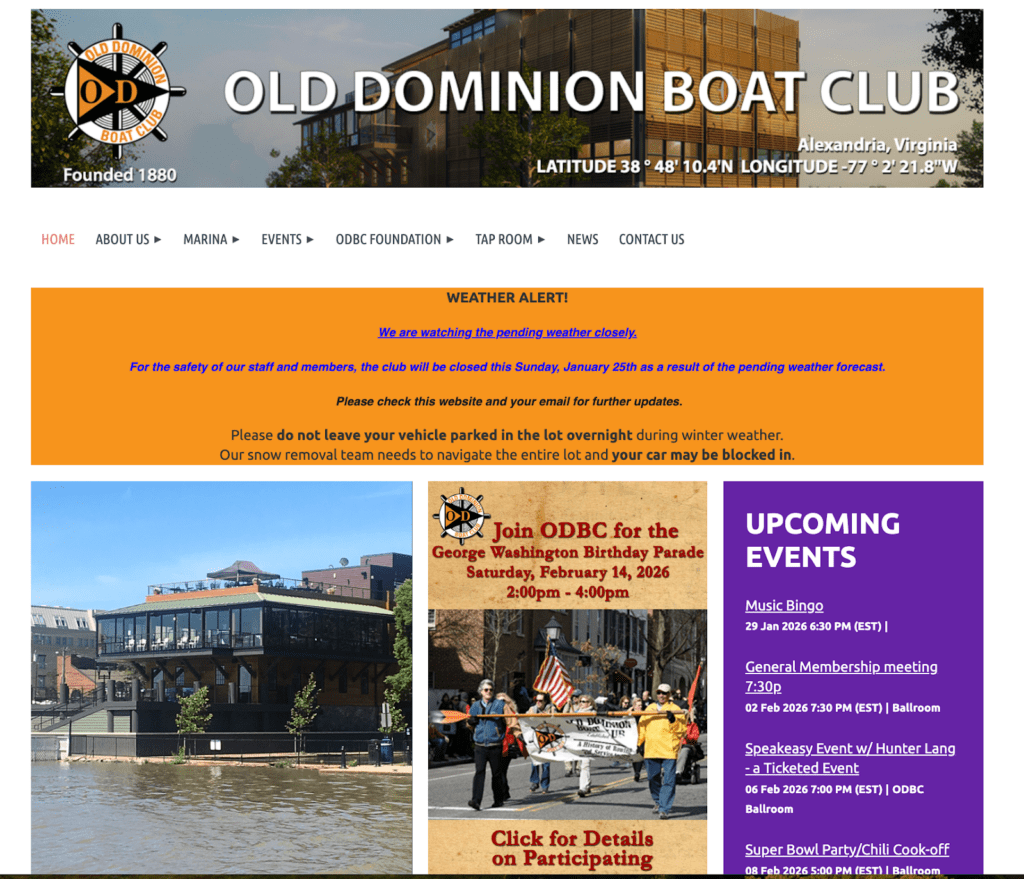
The Old Dominion Boat Club in Alexandria, VA, excels at transparency. Membership requirements are clearly outlined, the application process is straightforward, and their event calendar promotes both social and sailing opportunities year-round.
Bicycling in Greensboro

Bicycling in Greensboro out of Greensboro, NC, showcases community programs prominently, demonstrating impact and providing concrete engagement opportunities. Their clear mission communication attracts cyclists wanting to make their community more bike-friendly.
Propeller Club Port Norfolk
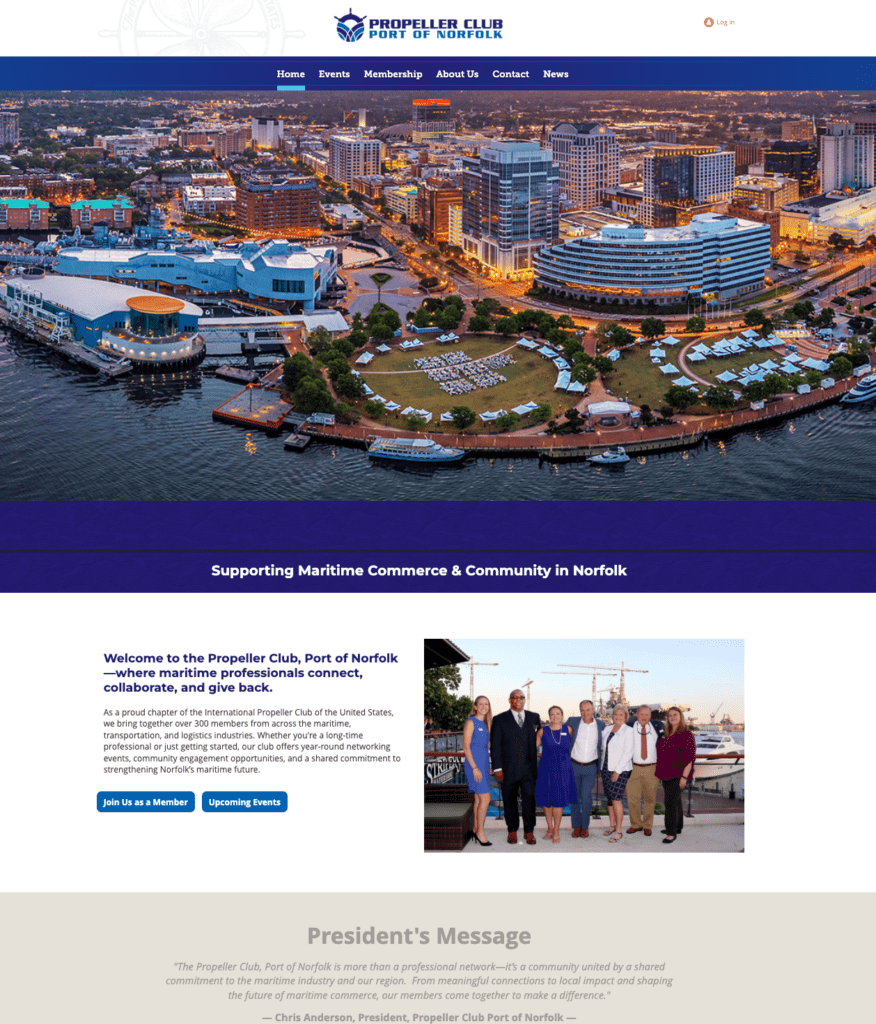
For more inspiration, browse additional membership website examples across multiple industries.
Frequently Asked Questions
What’s the difference between free and paid membership platforms?
Paid plans unlock significant capabilities that free plans restrict. For paid plans, you’ll get unlimited or much higher contact limits instead of being capped at 50-100 members. Online payment processing allows you to accept credit cards and automate billing. Platform branding and ads disappear, giving your site a more professional appearance. Storage increases dramatically, allowing for more content and resources. Premium features like mobile apps, advanced reporting, and automation become available. Priority customer support means faster responses when you need help.
The right choice depends on your current size and growth trajectory. If you’re just starting with a small group, free tiers work well. As you grow and professionalism matters more, paid plans become worthwhile investments.
How do membership websites make money?
Membership sites generate revenue through multiple streams: recurring membership dues (monthly or annual), tiered pricing with basic/premium/VIP levels, coaching and consulting services, digital products, in-person events, sponsorships, affiliate partnerships, and online merchandise stores.
This diversification creates more stable income because you’re not dependent on a single source.
Do I need coding skills to create a membership site?
Not at all. Modern platforms eliminated the need for technical expertise through drag-and-drop builders, pre-designed templates, one-click member area setup, and visual customization tools. WildApricot, Wix, and Weebly all let you create professional membership sites without writing a single line of code.
That said, if you want maximum customization or have very specific requirements, technical skills help. WordPress offers the most flexibility but requires the most technical knowledge. For most organizations, no-code platforms provide more than enough functionality without the complexity.
Can I upgrade from free to paid later?
Yes, every platform allows seamless upgrades when you’re ready. With WildApricot, you can start a free trial and switch to a paid plan after 60 days. Your content and members transfer automatically with no data loss.
What’s the difference between a membership site and a subscription site?
The distinction matters for how you structure your offering. Membership sites focus on community and access—members interact with each other through forums, directories, and events. The experience includes networking, content, and a sense of belonging. Professional associations and clubs exemplify this model.
Subscription sites focus solely on content consumption—subscribers watch, read, or listen to content but don’t interact with other subscribers or the creators. Netflix and Spotify are classic examples. There’s no community aspect, just access to media.
Many modern sites blend both approaches, offering exclusive resources plus community features. You might provide educational videos (subscription-style) while also hosting member forums and networking events (membership-style). This hybrid approach often delivers the most value.
How much should I charge for my membership?
Calculate your actual costs including platform fees, content creation, and marketing, then add margin for profit. Research what competitors charge for similar offerings and survey your target audience about their willingness to pay. Start at the lower end and increase prices as you add value. Offer an annual discount of 10-15% to encourage longer commitments.
Testing different price points helps you find the sweet spot where enough people convert while generating recurring revenue.
How long does it take to create a membership website?
If you’re using WildApricot’s templates and have content ready to upload, you could have a functional site running in a long weekend. If you’re creating everything from scratch, plan on 4-6 weeks from start to launch.
Start Your Membership Website Today
You’ve learned what membership websites are, how to plan and build one, and what it takes to grow a thriving community. Now it’s time to take action.
WildApricot is designed specifically for nonprofits, professional associations, clubs, and member-based groups. Over 32,000 organizations trust the platform, earning it recognition as Capterra’s top-rated membership software.
Ready to create a free membership website that actually drives engagement and revenue?
Start your 60-day free trial with WildApricot today – no commitment, no risk, and everything you need to launch in one place.
![Best Membership Website Examples in 2026 [+ 12 Design Tips]](https://www.wildapricot.com/wp-content/uploads/2023/10/Main-Blog-Thumbnails-2026-03-17T143806.792-1024x717.png)