



Whether you’re launching a new nonprofit, cleaning up years of bookkeeping, or moving to accounting software, one of the first things you’ll need is a well-organized chart of accounts (COA).
Your COA is essentially a filing system for your nonprofit’s finances. Every donation, grant, payroll expense, event registration, and office supply purchase that goes through your nonprofit is organized and categorized to make bookkeeping easier, audits less stressful, and IRS Form 990 preparation much more straightforward.
The good news is, most nonprofits—regardless of size—use the same basic framework. A volunteer-run organization might need only a few dozen accounts. In contrast, a large nonprofit with multiple programs and funding sources may need several hundred, but the underlying structure stays the same.
What Is A Nonprofit Chart Of Accounts?
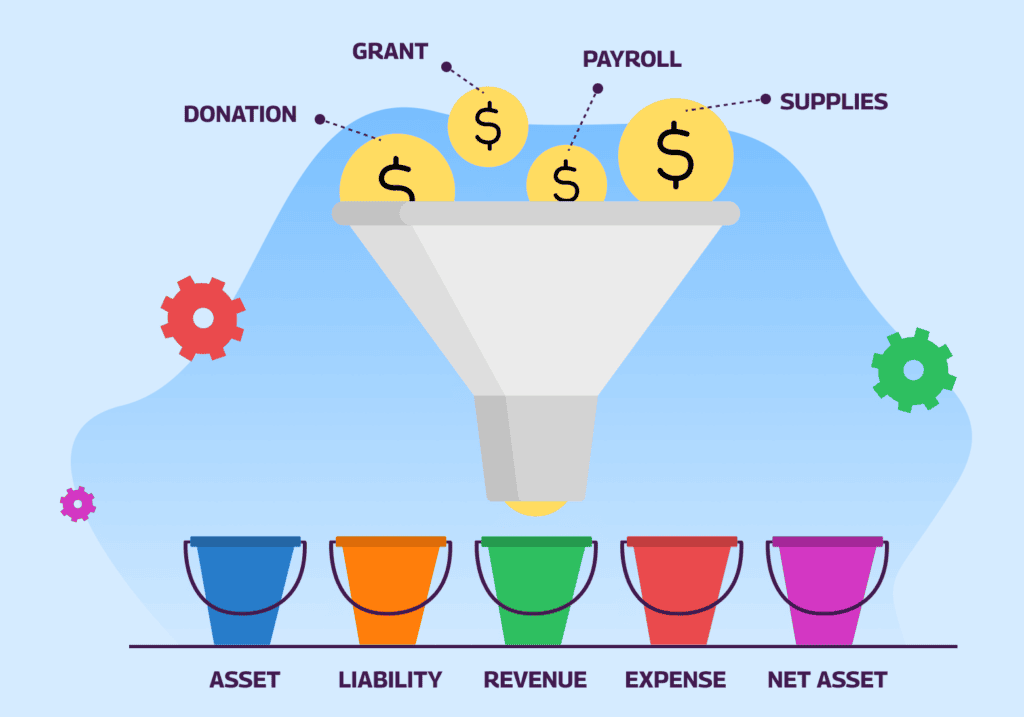
A chart of accounts (COA) is the complete list of financial accounts your nonprofit uses to record every financial transaction. Each account represents a specific type of asset, liability, revenue, expense, or net asset.
Instead of simply tracking “money in” and “money out,” your chart of accounts organizes transactions into meaningful categories so your nonprofit can answer questions like:
- How much money was spent on events versus payroll?
- How much grant revenue have we received this year?
- What donations are still restricted for future use?
- How much cash do we currently have available?
Every accounting system—including QuickBooks, Sage Intacct, Aplos, Xero, MIP Accounting, and many nonprofit accounting platforms—relies on a chart of accounts.

Why Nonprofits Need A Different Structure Than Businesses
Although nonprofits use many of the same accounting principles as businesses, the organization’s purpose changes how financial records are organized.
Because of that, a nonprofit’s chart of accounts typically includes:
- Separate categories for donations, grants, memberships, sponsorships, and earned income
- Expense categories that coincide with programs, administration, and fundraising
- Accounts that distinguish restricted and unrestricted resources
- Structures that simplify IRS Form 990 reporting and financial statement preparation
The goal isn’t to create more complexity—it’s to organize financial information in a way that reflects how nonprofits operate.
The Five Core Account Categories, Explained
Every nonprofit chart of accounts is built around five primary account types: assets, liabilities, net assets, revenue, and expenses.
| Assets | Assets are everything your nonprofit owns or controls that has financial value. Common asset accounts include:Checking accountSavings accountPetty cashAccounts receivableGrants InvestmentsProperty and equipment |
| Liabilities | Liabilities represent what your nonprofit owes to others, such as bills, debt, and payroll obligations. Examples include:Accounts payableCredit card balancesPayroll liabilitiesLoans payableAccrued expenses |
| Net Assets | Instead of owner’s equity, nonprofits report net assets. Net assets represent the organization’s financial resources after liabilities are subtracted from assets. You’ll commonly see two classifications: Net Assets Without Donor Restrictions: These funds can generally be used wherever the organization needs them. Examples include:Generic donationsMembership dues without restrictionsEvent revenue Net Assets With Donor Restrictions: These funds must be used in accordance with donor instructions, and once the restriction has been satisfied, the funds are released. Restrictions might include:Scholarship fundsBuilding campaignsCapital improvementsYouth program grantsEndowment gifts |
| Revenue | Revenue accounts record all incoming financial resources. Unlike businesses, nonprofits often receive income from many different sources. Typical revenue accounts include: Contributions: individual donations, major gifts, monthly giving, and corporate donations.Grants: government, foundation, and local grants.Earned Revenue: tuition, program fees, ticket sales, and merchandise. Membership Revenue: dues, certification fees, and continuing education.Fundraising Revenue: peer-to-peer fundraising, auction proceeds, and event revenue. |
| Expenses | Expense accounts track how resources are used. Many nonprofits organize expenses both by natural classification (what was purchased) and functional classification (why it was purchased). Examples of natural expense categories include:SalariesEmployee benefitsOffice suppliesRent UtilitiesInsuranceSoftware subscriptionsPrintingTravelMarketing Functional expense reporting then allocates these costs among:Program servicesManagement and generalFundraising This dual structure supports Form 990 reporting and audited financial statements. |
Standard Chart Of Accounts Numbering For Nonprofits
A standard nonprofit chart of accounts uses a 4-digit logical numbering system divided into the five core account categories. While there is no universal standard, this numbering convention is widely used and makes bookkeeping more consistent and scalable.
| Number Range | Account Category |
| 1000-1999 | Assets |
| 2000-2999 | Liabilities |
| 3000-3999 | Net Assets |
| 4000-4999 | Revenue |
| 5000-8999 | Expenses |
Tip: Leave gaps between account numbers (for example, 5110, 5120, 5130) so you can add accounts later without renumbering your entire chart.
Sample Nonprofit Chart Of Accounts
A small or mid-sized nonprofit might use a chart of accounts like this:
Assets
- 1000 Checking
- 1010 Savings
- 1100 Accounts Receivable
- 1200 Grants
- 1300 Insurance
- 1500 Furniture & Equipment
Liabilities
- 2000 Accounts Payable
- 2100 Credit Card Payable
- 2300 Accrued Payroll
- 2400 Deferred Grant Revenue
- 2500 Loan Payable
Net Assets
- 3100 Net Assets Without Donor Restrictions
- 3200 Net Assets With Donor Restrictions
Revenue
- 4100 Individual Contributions
- 4200 Corporate Contributions
- 4300 Foundation Grants
- 4400 Government Grants
- 4500 Program Fees
- 4600 Membership Dues
- 4700 Event Revenue
- 4800 Sponsorship Revenue
Expenses
- 5100 Salaries
- 5110 Payroll Taxes
- 5120 Employee Benefits
- 5200 Rent
- 5210 Utilities
- 5300 Office Supplies
- 5310 Printing
- 5500 Software
- 5700 Marketing
- 5800 Travel
- 5900 Event Expenses
As your nonprofit grows, you might separate software into accounting, fundraising, and learning management software if that level of reporting proves useful. The goal is to create enough detail to support decision-making, but not so much that everyday bookkeeping becomes overly complicated.
Tracking Restricted Vs. Unrestricted Funds
Tracking donor restrictions can be a challenge for new nonprofit bookkeepers.
- A restricted fund is money that a donor or grantmaker has specified must be used for a particular purpose or within a certain time period, such as scholarship funds, disaster relief, or donations to a specific campaign.
- Alternatively, an unrestricted fund has no donor-imposed restrictions and can generally be used to support the organization’s overall mission and operations.
Tip: For each restricted gift or grant, maintain documentation of the donor’s restriction, the donation amount, any reporting requirements, and any remaining restricted balance for future audits or grant reporting.
Common Chart Of Accounts Mistakes To Avoid
Even well-intentioned organizations can end up with charts of accounts that are difficult to maintain. Avoid these common pitfalls.
Creating Too Many Accounts
It’s tempting to create a separate expense account for every purchase or vendor, but this quickly becomes difficult to manage.
Instead of separate accounts for Zoom, Microsoft 365, Canva, and QuickBooks, consider using a broader “Software Subscriptions” account unless more detail is truly useful.
Ignoring Future Growth
Leave room in your numbering system for expansion. A chart with thoughtful numbering can grow for years without major restructuring.
Inconsistent Naming
Utilize naming patterns that everyone understands. For example, rather than alternating between “Gifts,” “Donations,” and “Contributions,” choose one classification and stick with it throughout (eg., Individual Contributions, Corporate Contributions, and Monthly Contributions instead of Individual Contributions, Corporate Donations, and Monthly Gifts). It’s also important to use standard abbreviations and avoid any duplicate account names.
Keeping Your Chart Of Accounts Audit- And Form 990-Ready
A well-designed chart of accounts isn’t just easier to use—it also makes year-end reporting significantly smoother.
To keep your records organized:
- Review your COA annually and archive unused accounts.
- Use consistent naming and numbering conventions.
- Keep documentation for every grant, restriction, and meaningful accounting decision.
- Record transactions promptly and reconcile accounts every month.
- Avoid duplicate or overlapping accounts.
- Work with your CPA or auditor before making any major structural changes to your chart of accounts.
Remember, your chart of accounts should evolve with your organization. The right chart of accounts provides clear financial information without adding unnecessary complexity.
IRS Form 990 is an annual informational return filed with the Internal Revenue Service by tax-exempt nonprofits that provides transparency on an organization’s mission, governance, and financial operations.
To maintain your tax-exempt status, you’ll have to provide (among other things) a detailed breakdown of revenues, expenses, assets, and liabilities, and compensation details for officers, directors, key employees, and highest-paid staff, as well as specific supplemental schedules for specialized activities like fundraising, gaming, or foreign operations.
It isn’t just about recording transactions. Your chart of accounts should become your foundation for sound financial management and informed decision-making across the organization. When your chart of accounts is organized, scalable, and consistently maintained, bookkeeping becomes easier, board reports are more meaningful, grant reporting takes less effort, and preparing for audits or IRS Form 990 filing is far less stressful. Tip: Wild Apricot’s Membership Management Software can help!
FAQs
What is a nonprofit chart of accounts?
A chart of accounts is the complete list of financial accounts a nonprofit uses to document every financial transaction into categories of assets, liabilities, revenue, expenses, or net assets.
How should a nonprofit chart of accounts be numbered?
A standard nonprofit COA uses a numbering system divided into the five core account categories. There is no universal standard, but this numbering convention is widely used and makes bookkeeping more consistent and scalable.
| Number Range | Account Category |
| 1000-1999 | Assets |
| 2000-2999 | Liabilities |
| 3000-3999 | Net Assets |
| 4000-4999 | Revenue |
| 5000-8999 | Expenses |
What’s the difference between restricted and unrestricted net assets?
A restricted fund is money that specifically must be used for a particular purpose or within a certain time period or for a specific campaign. Alternatively, an unrestricted fund has no donor-imposed restrictions and can generally be used in many ways to support the organization’s operations and mission.
How many accounts does a nonprofit need?
Less is more. You only need as many as is truly useful. It can be tempting to create a separate expense account for every purchase or vendor, but this quickly becomes difficult to manage.
Does a nonprofit chart of accounts need to match Form 990?
Yes. To maintain your tax-exempt status, you’ll have to provide (among other things) a detailed breakdown of revenues, expenses, assets, and liabilities, and compensation details for officers, directors, key employees, and highest-paid staff, as well as specific supplemental schedules for specialized activities like fundraising, gaming, or foreign operations annually with the IRS Form 990.