

Is your small nonprofit considering a CRM? A CRM gives your organization one place to store your contacts, gifts, memberships, volunteer hours, and notes.
This guide looks at seven CRMs for small non-profits, comparing them on price, features, and ease of setup. Each tool has its pros and cons. WildApricot, powered by Momentive, is no exception.
Do small non-profits need a CRM?
Not every small nonprofit needs a CRM. However, you’ll notice a CRM start to deliver real value when your spreadsheet becomes a bottleneck. Or if two staff members begin editing at the same time, they accidentally overwrite each other. Maybe a board member asks for retention figures, and you must build them manually.
If any of that sounds familiar, then it might be time to look for a CRM.
CRM for Small Nonprofits
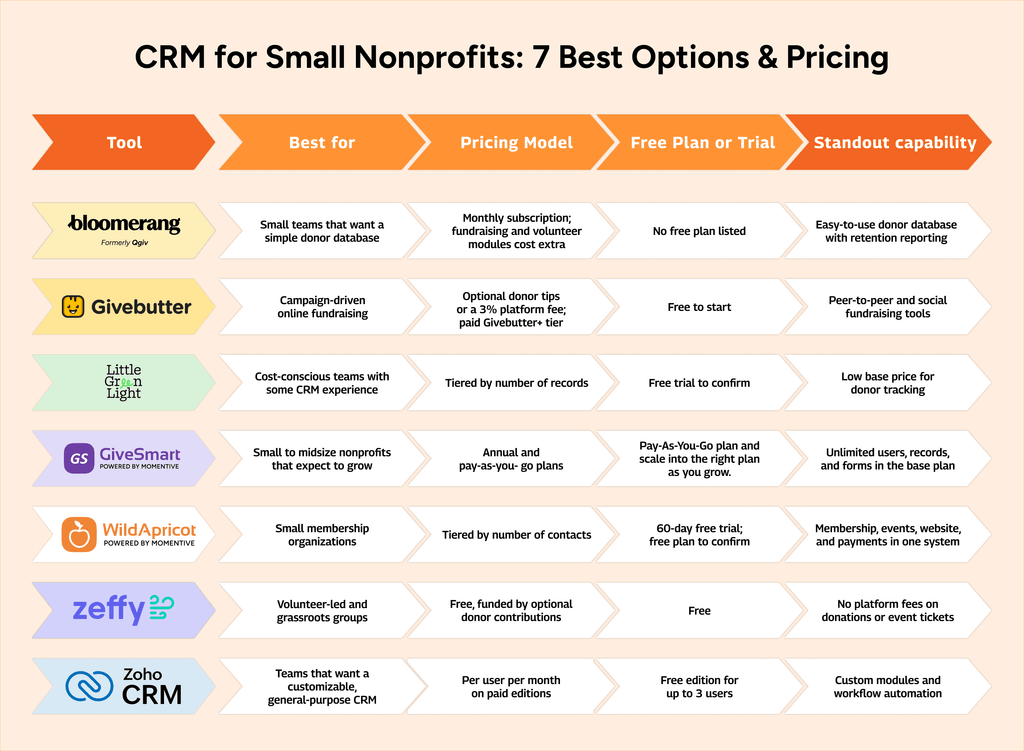
The right CRM will depend on how you intend to pay for it. Free and fee-based tools are ideal for fundraising first teams. Record- and contact-based plans are better suited to teams who are building up their list. The seven tools are listed alphabetically, and the sections below compare them by best fit.
Information verified in 2026.
How We Evaluated These CRMs
We scored every tool on the same five questions and noted one genuine downside for each one. That keeps the depth of comparison consistent across the list, and that’s the framework we used.
- Cost to start. What does a small team pay in month one, and is there a free or low-cost route?
- Cost as you grow. Does the price go up with contacts, records, revenue, users, or add-on modules?
- What’s in the small plan? Does it cover donor records, receipts, email, and reporting, or do those come separately?
- Setup without any IT help at all. Could a volunteer or a part-time dev lead get it running?
- When you’ve outgrown it, what’s the clearest indication that you need something bigger?
We compiled this list from the vendors’ own pricing pages, their documentation, and third-party review sites. Prices are subject to change, so always check the vendor’s site to confirm current rates before deciding.
We filtered out enterprise platforms and tools with no published route for small teams.
Bloomerang
Bloomerang is a donor database designed for small teams who want to retain the donors they already have. The core CRM covers gift records, email and direct mail, reporting, wealth screening and grant tracking. Online giving forms, events, and volunteer management are all separate modules. Compare it on cost, core coverage, and add-on depth.
Best for: small teams who want a simple donor database and a very short learning curve.
Pricing: The CRM starts at $125 a month, and the Giving+ fundraising module starts at $40 a month.
Pros:
- Donor records are straightforward to learn and quick to set up.
- Reporting centers on retention and giving history
- Wealth screening and grant tracking are in the core CRM.
Cons:
- Fundraising, volunteer, and other modules are all priced separately, so the total cost goes up as you add them.
- No free plan
- The entry price is higher than that of the record-based tools such as Little Green Light.
Givebutter
Givebutter began as a free online fundraising tool and has evolved to include a donor CRM. It’s aimed at small teams whose work centers on campaigns, events, and social sharing. In reality, it provides fundraising pages, donation forms, auctions, payment processing, a mobile app, and marketing tools. Compare it on cost, core offering, and add-on depth.
Best for: small teams who raise the majority of their funds online (particularly via campaigns and peer-to-peer).
Pricing: Givebutter uses a tip or fee model. If you have optional donor tips turned on, then the platform fee is 0%. If you turn tips off, then you’re looking at a flat 3% platform fee. There is a paid Givebutter+ tier which starts at around $29 a month.
Pros:
- Free to start, with fast setup
- Strong peer-to-peer, event, and social fundraising tools
- Donation data flows into the CRM automatically.
Cons:
- Reporting, segmentation, and automation are all much lighter in a standalone nonprofit CRM.
- Built for campaigns more than long-term donor relationships
- The tip request can be a bit awkward for some donors, particularly the older ones.
Little Green Light
Little Green Light keeps the price down by keeping the product very focused. It’s the ideal solution for a small team that wants a donor database, online donation forms, custom reports, and basic tracking for memberships, volunteers, and events. Compare it on cost, core coverage, and add-on depth.
Best for: Cost-conscious teams with a DBA who’s used a CRM before.
Pricing: Tiered according to the number of constituent records. Third-party sources list it at around $45/month for up to 2,500 records, increasing to around $135/month at 50,000. There’s an annual discount available. Payment processing is via Stripe or PayPal (separate fees apply).
Pros:
- Among the lowest base prices on this list
- Pricing is simple to forecast as it’s directly linked to the record count.
- Covers donations, memberships, events, and reports in one database
Cons:
- Support is via email only.
- Reviewers say it can be a bit challenging for newcomers.
- Fewer built-in extras than all-in-one platforms
GiveSmart
GiveSmart, powered by Momentive Software, is a fundraising platform that combines online giving, events, auctions and ticketing, with an optional Donor CRM. The pieces share one contract and one login, and a giving history syncs between them daily.
Best for: small to midsize non-profits that run galas, auctions, or other live events and want fundraising, ticketing, and donor records from one vendor.
Pricing: GiveSmart’s Flex Pricing offers an annual subscription or a pay-as-you-go option. Pricing is fixed, with no transaction, ticketing, or per-donation fees. Public dollar amounts aren’t listed.
Pros:
- Fundraising, events, and Donor CRM share one login and sync daily.
- No transaction, ticketing, or per-donation fees, according to vendor.
- Support is available seven days a week, including nights and weekends.
Cons:
- No public price is listed.
- A suite built around events and fundraising might be more than what a team with a simple donor list needs.
- No self-serve free trial.
WildApricot
WildApricot began life as membership software and is effectively a CRM for small organizations where your members are also your supporters, volunteers and event guests. One contact database powers your member directory, event registration, online payments, email, and website. If you’re a small non-profit that runs memberships and events together, then it’s worth comparing it on cost, core coverage, and add-on depth.
Best for: small membership-based non-profits, clubs, and associations who want contacts, dues, events, and a website all in one place.
Pricing: Tiered by number of contacts (members, donors, volunteers, and event guests all count as contacts). Third-party listings have six tiers (100 to 15,000 contacts), starting at about $63/month for 100 contacts. WildApricot has a 60-day free trial.
Pros:
- Membership, events, payments, and the various website tools all draw on the same database.
- A volunteer can set it up without any IT involvement.
- The 60-day trial allows a small team to test it with real data.
Cons:
- Contact tier pricing increases as your list grows, and non-members count toward the limit.
- It’s not a dedicated fundraising platform. If you’re primarily focused on major gifts or grants, you’ll probably want the more donor-specific functionality you’d get from a tool like Bloomerang or GiveSmart.
Zeffy
Zeffy is a free fundraising platform with a very light CRM built in. It provides volunteer-run groups with centralized contact records, donation forms, event ticketing and check-in, peer-to-peer fundraising, raffles, and automatic receipts. You can compare it on cost, core coverage, and add-on depth if you’re looking for no-budget fundraising tools.
Best for: grassroots and volunteer-run non-profits who want to accept gifts and run events but have no software budget.
Pricing: Zeffy is free. There are no monthly fees, contracts, or processing fees. The platform is funded by optional contributions which donors can add at checkout. There is no paid tier.
Pros:
- Costs nothing to start or to run
- Covers donations, tickets, and receipts in one place
- No contract to cancel if it stops fitting
Cons:
- Limited automation, reporting, and integrations
- Simple data structures, so complex segmentation is very difficult.
- The optional contribution prompt can confuse donors, as they don’t necessarily realize it’s optional.
Zoho CRM
Zoho CRM is a general-purpose CRM (not a non-profit CRM), so it’s the most flexible and the one that will expect the most from you. It’s the tool of choice for very small teams that need custom modules for donors, grants, partners, and program participants, and want to automate follow-ups. If you need the most flexibility, compare it on cost, core coverage, and add-on depth.
Best for: very small teams, near-zero budgets, and users comfortable configuring software.
Pricing: Zoho CRM free free version supports up to 3 users with no time limit. The paid versions are priced per user per month. Third-party sources list the Standard at around $14 per user per month and the Professional at $23 per user when billed annually. There’s some discrepancy among sources about whether Zoho offers a non-profit discount.
Pros:
- The free version covers contacts, reminders, workflow automation, and reports.
- Custom modules allow you to track what your organization needs.
- Mobile apps are included.
Cons:
- No built-in gift tracking, donation forms, or tax receipts, so you’d build or integrate them
- Setup takes significantly longer and is less technically comfortable than with the organization-specific tools.
- Per-user pricing obviously adds up when you have both board members and volunteers all needing logins.
Key Features to Look for in a Small Nonprofit CRM
Small teams don’t need every feature. You need the ones that save you hours every week and protect your data should a volunteer go. Look for those first:
- One record per person. All gifts, memberships, event attendance, volunteer hours, and notes all go on the same person record.
- Automatic online donation forms. Hand-issued receipts are the first thing most teams want to get rid of.
- Simplified reporting. Easy-to-read, accessible reports on your organization’s giving, lapsed donors, and renewals.
- Email linked to your contacts. You shouldn’t need to export a file to send to a segment.
- Data export. You should be able to take your data with you if you switch tools.
Skip the fancy features until you’ve got the basics in place. Predictive scoring and wealth screening only become relevant once you’ve got a donor base and someone with the time to act on it.
How much does a CRM cost for a small non-profit?
A tiny not-for-profit can pay anywhere from nothing to about $125 a month to get started. The entry-level prices for the tools in this guide are in that bracket.
The sticker price matters less than the pricing model. Each model grows differently as your organization does:
| Pricing model | How it works | Tools | Watch for |
| Record-based | Price rises with the number of records | Little Green Light | Duplicate and old records still count |
| Contact-based | Price rises with the number of contacts | WildApricot | Members, donors, and guests all count |
| Revenue-based | Price follows your organization’s revenue | Neon CRM | Price rises as fundraising succeeds |
| Per user | Price multiplies by the number of logins | Zoho CRM | Volunteer and board logins add up |
| Fee-based or donor-funded | You pay a percentage, or donors cover costs | Givebutter, Zeffy | Fees or tips may suit some donors less |
| Base plus modules | A core price plus separate add-ons | Bloomerang, Neon CRM | Fundraising, volunteer, and event modules |
Costs outside the subscription often matter just as much:
- Payment processing. Card fees will apply on most platforms, and these are in addition to the subscription.
- Add-on modules. Depending on the CRM, events, volunteers, and memberships are sometimes extras.
- Staff time. A tool that’s cheaper but takes ten extra hours a month for staff to run isn’t cheaper for your organization.
Before you commit to moving to a CRM, ask each vendor what your bill looks like when your list doubles.
When to Move from Spreadsheets to a CRM
Move when the spreadsheet costs you more time than a CRM would cost you in money. You don’t need a set number of donors. You need a few of these indicators:
- Two or more people edit the list, and changes get overwritten/lost.
- You send the receipts and thank-you notes by hand.
- You can’t tell who gave last year and who didn’t this year without a right old afternoon of sorting.
- Member renewals, event sign-ups, and donations all live in separate files.
- One volunteer holds the only current copy, and nobody else knows where it is
- Your board wants retention or giving trends, and you build them from scratch each time.
- You’re past a few hundred and still adding.
If three or more apply, then go for a free trial and import a copy of your list. If one or two apply, then a free tool such as Zeffy or the free edition of Zoho CRM will do the trick.
If you’re under a few hundred contacts, have just one person managing the spreadsheet, and don’t run any events or collect any dues, you can reasonably stay on a spreadsheet a bit longer. A clean template with consistent columns is far better than a frantic migration.
Best CRM for Small Membership-Based Nonprofits
If you’re collecting dues, then your CRM is doing a very different job. Your members will be renewing every year, attending events, and expecting to update their own details in some way. A donor database can absolutely do all of that, provided you have the right bits in place.
Membership-based organizations usually need these on top of the basics:
- Dues billing and renewal reminders
- A member portal or directory
- Event registration tied to member status
- A website that shows content by membership level
Neon CRM and Little Green Light track memberships alongside donors. WildApricot starts with memberships and then adds donations, which makes sense for an organization where the bulk of its income comes from membership dues and events.
WildApricot offers a 60-day free trial. For a wider look at nonprofit CRM options, see our Best Nonprofit CRM Software guide. For more on how WildApricot supports the nonprofit sector, head over to our nonprofits page.
FAQ
What is the best CRM for a small not-for-profit?
The best CRM is the one that fits your budget, staff capacity, and fundraising model. If you’re a predominantly online team, you’re likely to start with either Givebutter or Zeffy. If you’ve got a growing donor list, then Little Green Light, Bloomerang, or Neon CRM are the ones you’ll be looking at. Membership groups will be looking at WildApricot or Neon CRM.
Is there a free CRM for small nonprofits?
Yes. Zeffy is free and is funded by optional donor contributions. Zoho CRM has a free edition for up to 3 users. Givebutter is free to get started with either optional donor tips or a 3% platform fee. Free tools will generally have restrictions on automation, reporting, and integrations.
How much does a non-profit CRM cost?
Small non-profits can pay from nothing up to around $125 a month to get started. The price will vary depending on the model: per record, per contact, per revenue, per user, or by fee. You need to ask each vendor what their price would be if your list doubled.
Do small non-profits actually need a CRM?
Not at first. A spreadsheet is fine for a few hundred contacts if one person is looking after the list. A CRM starts to pay off when multiple people share the data, your receipts and renewals start to pile up, and you find yourself unable to answer simple questions like, “Have you got a giving question?”
When should a non-profit move from spreadsheets to a CRM?
Switch when the spreadsheet is actually costing you more time than a CRM would. Common indicators include edits being overwritten, receipts being sent by hand, dues and donation files being in various places, and one volunteer having the only current copy.
What is the difference between a Non-Profit CRM and membership management software?
A non-profit CRM will track donors, gifts, and fundraising. Membership management software handles dues, renewals, member directories, and event registration. Some software does both. If your revenue is predominantly from dues, then you’ll want to start with the membership features. If your revenue is mostly from gifts, then you’ll want to start with the donor features.
Pick a Starting Point and Test It
You don’t need the perfect CRM. You need one that takes your list out of the spreadsheet and puts it into a system that your team will actually use. Start with how you raise money, then match the pricing model to how your list will grow.
Whatever tool you end up with, test it with a copy of your real data before committing. A free trial will show you in a week what the feature list can’t.
If your work revolves around dues, events, and a member list, then give WildApricot a go for 60 days free. [CTA button: Start Your Free Trial]
Want a wider view of the market? Check out our Best Nonprofit CRM Software roundup or Momentive Software’s nonprofit CRM guide.
